Selective Deployments in Microsoft Fabric with fabric_cicd: Why Your CI/CD Validation Might Be Checking the Wrong Thing

Selective deployments with the fabric-cicd python library are highly useful for shipping just the items that actually changed in your CI/CD process. Unfortunately, by default, it also tells you that a deployment succeeded when nothing was deployed at all.
This blog showcases an example where we selectively deployed Fabric items to upper environments, not realising that the dev ops pipeline reported as "successful" but did not contain our intended changes. We will then dig into some quality checks that highlighted a bigger error in the way Microsoft Fabric handles item naming in a repository.
You'll learn how to help safeguard from human error in selective Fabric deployments, as well as create useful build validations in Azure DevOps that help to keep your repository resource names clean and fit-for-purpose. All this is achieved through two simple CI/CD pipelines.
Behind the scenes we are using YML CI/CD pipelines to call our logic captured in Python code. This is all called through Azure DevOps Pipelines, but the same concept applies for other Dev Ops platforms.
Silent errors in selective deployments
When releasing items to upper environments, like test or prod, we can do selective (or incremental deployments) using the fabric_cicd Python package, focusing only on the items which have changed, rather than redeploying the whole set of Fabric items. Without getting too deep into the pros/cons of this approach too much, here's a couple of key takeaways for and against this approach
For:
Selective objects only is much quicker
Deployment doesn't require everything to stop during a deployment window
Against:
Prone to human error (typo, copy + paste)
Preview feature, notably struggling with dependencies
This is achieved through using the items_to_include option, as demonstrated below:
publish_all_items(
    target_workspace,
    items_to_include=["MyNotebook.Notebook", "MyPipeline.DataPipeline"]
)
Note: At time of writing (v0.1.32), this is an experimental feature that needs enabling.
Example
The following example showcases a silent error when deploying a notebook that doesn't exist. Maybe because of a typo, maybe because it hasn't been deployed to the repo yet.
items_to_include=["not_real.Notebook"]
A failure would have been the better outcome here, as we'd like to know that the thing we specified did not deploy correctly.
The first fix
A natural first response is to implement a validation step before you deploy. This helps minimize human error from typos, copy and pasting incorrect or repeated values. We added a stage ahead of the publish step that takes the list of requested item names and checks each one exists in the repo before the deployment is allowed to continue. If a name doesn't match anything, fail loudly with a clear error listing what's missing. The code itself is pretty straight-forward, it simply searches the folder names within our Fabric sub-folder in our Git repo, and confirms if there is a match. We can create some simple functions to do this for us:
def item_in_scope_list(items_to_include: list, item_type_in_scope: list) -> list:
    _list = []
    for item_name in items_to_include:
        try:
            item_type = item_name.split(".")[1]
        except IndexError:
            _list.append(item_name)
            continue
        if item_type not in item_type_in_scope:
            _list.append(item_name)
    return _list


def find_repo_item_names(repo_directory: str) -> list:
    repo_item_names = []
    for _, dirs, _files in os.walk(repo_directory):
        repo_item_names.extend(dirs)
    return repo_item_names

def missing_items_list(items_to_include: list, repo_item_names: list) -> list:
    _list = [item_name for item_name in items_to_include if item_name not in repo_item_names]
    return _list


def raise_mismatch(mismatch_list: list) -> None:
    if len(mismatch_list) == 0:
        return
    else:
        print("The following items do not appear to exist within the selected scope:")
        for i in mismatch_list:
            print(f"\n {i}")
        message = f"Review the items in the list {mismatch_list}"
        print(f"##vso[task.logissue type=error]{message}")
        raise ValueError(message)
These functions can then be in our main validate_items.py file, such as below:
repo_item_names = find_repo_item_names(repository_directory)
missing_list = missing_items_list(items_to_include, repo_item_names)raise_mismatch(missing_list)
We can now catch our misnamed input variables at runtime!

Where this can get stuck
As we've showcased briefly through the code snippets above, this validation checks the folder names within our repo to validate the item name we are looking for exists in the repo.
While this sounds good, it exposed another issue with Fabric's Git integration. To give an example before getting into the what's and why's, consider an item which does exist in the repo, that we do wish to deploy:
items_to_include=["real.Notebook"]In this case, we again hit validation errors, suggesting that the file doesn't exist:

We check Fabric to confirm that the file does actually exist and is synced to Git:

We then dig into our repo, on the branch we're deploying from, and encounter the source of the problem:
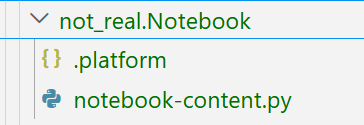
The folder we're checking has the wrong name! How did this happen?
How a Fabric item ends up in Git
If you're running Microsoft Fabric with Git integration, every item in a workspace gets exported to its own folder in the repo. The folder is named <DisplayName>.<ItemType>, and inside it sits a .platform file. This file is how Fabric captures the metadata for that item.
MyNotebook.Notebook/
├── .platform
└── notebook-content.py
That .platform file is where things get interesting, an example shows the json below:
{
  "metadata": {
    "type": "Notebook",
    "displayName": "MyNotebook"
  },
  "config": {
    "logicalId": "a1b2c3d4-e5f6-4a5b-8c9d-0e1f2a3b4c5d"
  }
}
The logicalId is what actually binds a workspace item to its Git representation. Microsoft's docs are explicit that this is the thing that preserves the link even if the name or directory change. This is where our issue stems from when using the fabric-cicd library: as the folder name and the .platform displayName are supposed to describe the same item, but this is not enforced within a Fabric repo, and drift can occur in a few scenarios.
This drift is our exact issue.
Where the drift comes from
We assumed going in that this was a vague "things get renamed and the repo doesn't catch up" problem. It's more specific than that, and the two causes we saw have genuinely different mechanisms.
GUID-named folders
In the event that the item name given by a user in the Fabric UI is not compliant with a set of Git naming constraints, then Fabric falls back to naming the folder as the logicalId.ItemType.
Note: Per the Git source code format documentation, if a display name is longer than 256 characters, ends in a space, or contains a character that isn't valid in a directory name (" / : < > \ * ? |), Fabric can't represent that name as a folder.
This isn't a temporary "new item, not renamed yet" state. An item stays GUID-named for as long as its current display name still trips one of those rules.
Example:

Folder / displayName mismatches
Renaming an item through the Fabric UI is designed to update the Git folder name on the next commit, keeping the item name in Git and the workspace in sync. If this folder is renamed directly in Git, in an IDE or a manual PR, without going through the Fabric UI, then this can diverge.
Example:

The validation is performing the wrong check
Our validation answers the question "does a folder with this name exist in the repo?" by walking the directory tree and comparing on-disk folder names.
That is not the question that determines whether fabric_cicd will publish something. Reading the library's source shows that the package builds a map of known items by reading each .platform file and using metadata.displayName to deploy the item specified.
Two problems, not one
The functional problem:
Our pre-deploy validation checks the wrong identity. This bug existed from the day the script was written, completely independent of whether any drift existed anywhere in the repo. In a clean repo the bug is invisible, because folder name and displayName are identical everywhere, so checking the wrong one happens to give the right answer. Drift didn't cause this bug, it just higlighted the inconsistency.
The cosmetic problem:
Folder names and .platform displayNames drifting apart is a genuine repo-quality issue. It's confusing to browse a repo where folder names don't match what you see in the Fabric UI.
While we could refactor our functional pre-deployment validation step to look at the .platform files instead, this felt like a good opportunity to do some Repo clean-up instead. If we can add additional validation that checks that all folder names match their .platform displayName values, we can ensure our repository is clean and readable. In the way we've implemented our validation already, this is a fairly lightweight check compared to digging into the .platform files. By continuing to use this, we preserve a bit of the efficiency in the validation at deployment time, with the assumption that we've done our repo quality checks up-front, at development time.
Building the hygiene check
Putting together an independent CI check, we can flag two quality flags:
Check | What it does |
GUID-named folders | Display names that trip Fabrics character/length fallback rules |
Folder ≠ displayName | Folders named directly in Git/Outside the Fabric UI |
For ease-of-use in Azure DevOps, we'll actually write this functionality as tests, which we'll show off later. I shamelessly got Claude to help put this simple logic together:
from pathlib import Path
import os

import pytest
from validate_file_naming import (
    find_item_folders,
    is_guid,
    item_name_from_folder,
    read_platform_display_name,
)

FABRIC_DIR = os.environ['DIR_PATH']

_ITEM_FOLDERS = find_item_folders(str(FABRIC_DIR)) if FABRIC_DIR.is_dir() else []
_PLATFORM_FOLDERS = [f for f in _ITEM_FOLDERS if (Path(f) / ".platform").is_file()]


def _relative_id(folder: str) -> str:
    return str(Path(folder).relative_to(FABRIC_DIR))


@pytest.mark.parametrize("folder", _ITEM_FOLDERS, ids=_relative_id)
def test_folder_name_is_not_a_guid(folder):
    item_name = item_name_from_folder(Path(folder).name)

    assert not is_guid(item_name), (
        f"'{item_name}' looks like an auto-generated GUID - rename this Fabric item"
    )


@pytest.mark.parametrize("folder", _PLATFORM_FOLDERS, ids=_relative_id)
def test_platform_display_name_matches_folder_name(folder):
    item_name = item_name_from_folder(Path(folder).name)
    display_name = read_platform_display_name(str(Path(folder) / ".platform"))

    assert display_name == item_name, (
        f"folder item name '{item_name}' does not match .platform "
        f"metadata.displayName '{display_name}'"
    )
Dev Ops Tip! We can can configure pipelines to run on pull requests and pushes to our specific branches, to add additional data quality gates before allowing code to move to production. One useful mechanism in Azure DevOps is to set a pipeline as a "Build Validation Policy". Below, I have two testing pipelines as part of my master branch's policy. These must pass to be able to approve a Pull Request!

This pipeline can then be set up to publish these results as standard test output, and fails the build with a message pointing at exactly which folder needs attention.
pool:
  vmImage: ubuntu-latest

steps:
- checkout: self

- task: UsePythonVersion@0
  displayName: Use Python 3.12
  inputs:
    versionSpec: '3.12'
    addToPath: true
    architecture: 'x64'

- script: |
    python --version
    python -m pip install --upgrade pip uv
    uv sync --locked
  displayName: Install dependencies

- script: |
    uv run pytest python/tests/repo_checks --junitxml=test-results/junit.xml
  displayName: Run file naming checks

- task: PublishTestResults@2
  displayName: Publish test results
  condition: succeededOrFailed()
  inputs:
    testResultsFormat: JUnit
    testResultsFiles: 'test-results/junit.xml'
    testRunTitle: 'Fabric item file naming'
    failTaskOnFailedTests: true

At the point of first running this, we have a bit of a backlog of things to clean-up, but taking this forwards we expose less and less issues at time of committing code, identifying quality issues in our repository as they arise, and helping prevent any files reaching production that do not meet our internal standards.
Conclusion
What started as debugging a simple functional issue evolved into exposing issues with our repo hygiene. Implementing validation steps to automated processes are great for assisting a streamlined, accurate and transparent output for deployments, but it is essential to understanding the tools being used, regardless of the process or platform.
The implemented approach allows us to handle correctness and cleanliness with different urgencies. I've included a few takeaway points to consider below.
If you're using items_to_include, or any similar selective-deployment filter in another tool, review then following:
Does your pre-deploy validation check the same condition that your deployment step uses?
If a requested item silently fails to resolve, does anything surface in your log output?
Do you have a CI gate for the naming and metadata drift? Is it wired as a required check rather than a pipeline that can fail without blocking a pull request?
Has that gate ever been run against your existing repo state, or only against new changes going forward?
If your answer to any of those is "not sure", then spend some time investigating, ideally before a deployment tells you it succeeded when it didn't!
Have you hit silent no-ops with selective deployment in Fabric, or found a different approach to validating item identity before publishing? Let us know in your responses.
Thanks for reading



Comments