Fabric Variable Libraries

Updated: Mar 11

One of the big issues with Deployment Pipelines in Fabric, or as I call them Disappointment Pipelines, has been the lack of being able to parameterise connections. You do have deployment rules in the pipelines, but they are limited in functionality and don't support pipeline parameters (boo!), so if you need to push and change items between workspaces in a typical Development, Test and Production workspaces scenario, you had to configure the connections manually, which is a massive pain. Variable Libraries should make the experience of deployment a lot easier.
What's good about Library Variables?
They are your centralised, consistent, maintainable, collaborative friend! You no longer have to hardcode values, you can maintain one location for parameters and can be used to distribute these variables to your team. Good old write once, use anywhere (If supported by your Fabric service of choice). It is best for items that are NOT sensitive, for example no passwords, service principal details etc, but for configuration items that your data process needs. Let's have a look and show you what they are and how to use them.
Variable libraries overview

Once you have set up your new variable library you can create items in them. As you can see, you need three things to enter, name of the item, Type (String, GUID, Int etc) and the value you want to store. Nice and easy.
You can also add 'Value Sets', which are alternate values for those items. In the example above I've added Test and Production. They don't have to be set for environment details. You can if needed, store alternate values, for example primary and secondary access keys, and then switch them over if you need regenerated key values to be used.
You can deploy your variable library across to your Test and Production workspaces, then active the value set you what to use in that environment. One of your considerations is, are you fine with anything that is set for Test and Production being viewed?
If you’re fine with doing that cool, again, a reminder DO NOT store anything sensitive in them. Values will be stored in DevOps repos if you are using source control. Use an Azure Key Vault with some nice RBAC added to it, to securely store your sensitive data. If not, you'll need to update any values in the respective workspaces you deploy them to.
A nice touch is the ability to add a 'Note', which if you have a naming connection in place can lead to some abstracted names of items, so you can at least add a reference to remind yourself of some details. I totally understand that sounds like documentation and don't want to do that!
You can add permissions to the variable library, to limit access, and the types of access are Read, Write and Reshare.
Using library variables in pipelines
The best place to start with library variables is data connections. So I'm going to show you how to parameterise a database connection. You need two variables set up. The Connection Id and the Database Id
In the variable library the first item I have created is 'mjl_store_sqldb_01_dev_connection_id' and in that variable I need to store the unique id for that connection found in the 'Manage connections and gateways'. Grab that, copy and paste it to the variable library.

The next items you'll need is the database Id. In this case I'm using a Fabric SQL Database. So that can be grabbed from the URL which is in the format of:
Copy and paste the database_id, which I've added to the variable 'mjl_store_sqldb_01_dev_db_id'
You need to go to the 'Library variables' section of the pipeline to add them. Sadly, you must add them one at a time. you can't click '+ New' and add a load at a time. You can rename them, as by default it just adds the library variable name to the name of the variable. You can also reference multiple libraries, if you have them

So on the connection select 'Dynamic contact' and add the first variable:

You may now see the Workspace ID being added and populated. You can add in a library variable for workspace if needed, or use the '@pipeline().DataFactory' System variable to get the Id of the workspace the pipeline is running in, if you need to make it dynamic. I've just set the source in the below screenshot, you can also add variable libraries for the destination.
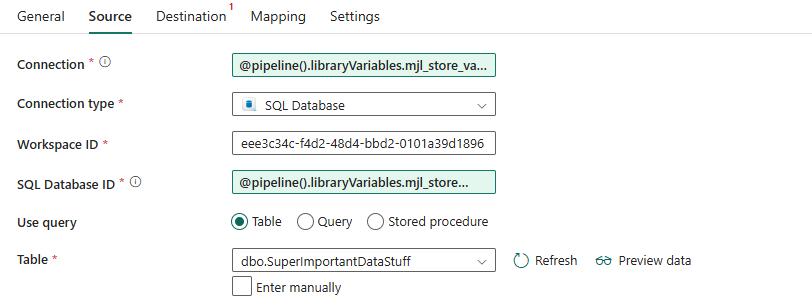
What happens when you deploy it? Well assuming you have the same named Variable Library in your other workspace, it will deploy and use that one. Don't forget to active the correct Value Set in that workspace. Any connection and database ids set to other values will be used. You don't have to do a thing. If you have named your Variable Libraries, with for example '_dev' or '_test' you'll have to repoint them in the connection task.
Using variable libraries in notebooks
You can read variable libraries in notebooks using the notebook-utilities built in package. Details here https://learn.microsoft.com/en-us/fabric/data-engineering/notebook-utilities#variable-library-utilities
To get the whole library you can use:
Variable_Library = notebookutils.variableLibrary.getLibrary("[variable_library_name]") For example, I would use:
Variable_Library = notebookutils.variableLibrary.getLibrary("mjl_store_variable_library") You can access a library, but you don't get to access it via a specific value set, it will only show the active value set.
This returns a Dict like class, which you can them get individual item from using the normal notation:
print(Variable_Library.mjl_store_sqldb_01_dev_connection_id) Or you can just get the one item your need using:
notebookutils.variableLibrary.get("$(/**/[variable_library_name]/[variable_name])") For example, I would use:
notebookutils.variableLibrary.get("$(/**/mjl_store_variable_library/mjl_store_sqldb_01_dev_connection_id)" Again, do NOT store anything sensitive in Variable Libraries, unlike notebooks accessing Azure Key Vault items, you will be able to use a print statement to see them, not [Redacted] like Key Vault Secrets display!
Limitations
There are a few limitations where you can't use Variable Libraries particularly in Data Pipelines:
You cannot use them for all connection types. I was trying to use them with semantic models, but it looks like you can't do it.
You cannot use them to set default pipeline parameters; there is no dynamic content option for them. You can use them in the 'Set Variable' task which is great.
You can't secure it down to the individual item in a library, just the library itself.
Considerations
Just to round up some the things you need to think about library variables:
One library to rule them all?
So one library or one for each environment? You could have one for dev/test/production, with only the variables required in each workspace. Or one created and deployed across workspaces and use active value sets. It will depend on how you want to secure and maintain the items. You'll have to balance the creation and maintenance of variables, to suit your needs.
You can't have a single set in a common location, as you must have an active value set, so you can't have one global one that Dev/Test/Prod workspaces can use. You can have multiple variable libraries, but you can't parameterise the library you connect to in your pipeline. It very much depends on one variable library, created in Dev, with Test and Prod value sets, that get deployed across workspaces.
Supported Connections
Currently not all connection types are supported by library variables. As mentioned in the limitations, I hoped I could use them in a semantic model connections, but you can't do it. You may have to have a mix of Variable Libraries and Deployment Rules in Fabric deployment pipelines, which is nicely inconsistent.
Managing your connections
How are your connections set up? MS Fabric is moving to defined connections for objects in the 'Manage Connections and gateways' interface. It has moved away from being able to just select a lake house object, to having to create a lake house connection, which can then be referenced. I'm not worried using Ids but of the creation and management of those connections. If you going to use Ids, there needs to be a better way of accessing and maintaining them and stopping people from creating the same connection under their own account name. Otherwise, things could be a bit messy in figuring out which is a valid Id if they get shared.
Recommendations
It would be best to separate out the Variable Libraries into functional versions. For example have one for the main platform variables, for example Key Vault, Logging settings etc that are accessed by all the Fabric services, and another Variable Library for the main data processing settings, connections, folders, other metadata needed for the processing of the data. This allows you to lock down access to specific requirements.
Also ensure that there is some sort of naming convention for the variables, it is all to easy for things to expend out to 'db_id' and 'db_id2'. So keep an eye on those users!
Round Up
Variable Libraries will take the headache out of some deployments, and it's nice to see the use in both pipeline and notebooks, it's going to be a valuable piece of the puzzle for reference/metadata, however it would be nice to see a secure version like Key Vault. Fabric Variable Libraries are sort of the way there, maybe a tick box to make secure, so you can't expose them in a notebook and read the values, or some extra governance controls around them. They have made my life a lot easier in deploying items across workspaces, I hope you will too.


This was a very engaging and insightful post that clearly explained why some courses are considered the hardest degrees in the UK. I liked how the author highlighted both academic pressure and practical challenges faced by students. It gives a realistic view of how demanding these degrees can be. As a student, I find such content helpful because it prepares us mentally for what to expect. It also reminds us that difficulty is subjective and depends on interest and dedication. Posts like this are informative and motivating for anyone planning their academic journey.